Multiview
Fixed 4-view multiview PNG for LLM-driven design loops.
//! Fixed 4-view multiview PNG for LLM-driven design loops.
//!
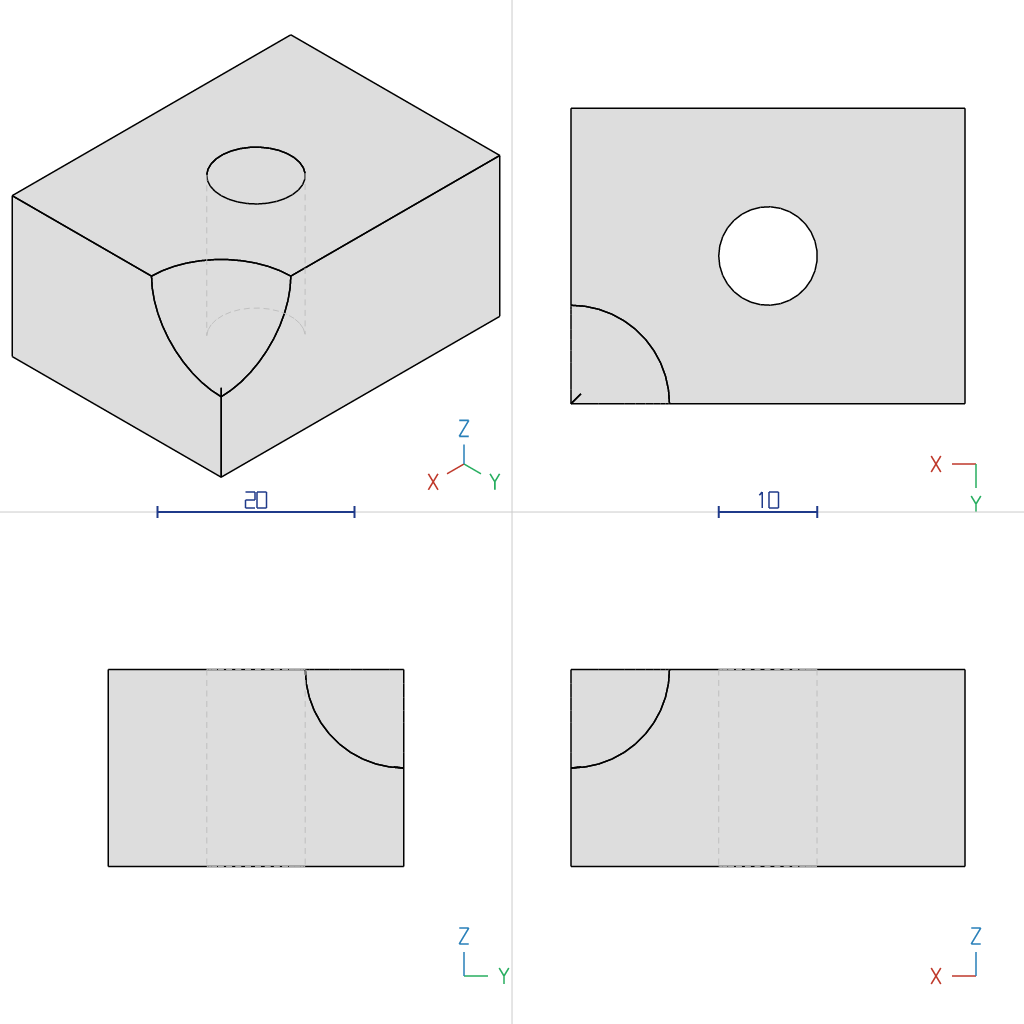
//! A single call to `Solid::write_multiview_png` produces a 1024×1024 PNG that lays out
//! 4 views — ISO plus the axis cyclic order (+X / +Y / +Z) — at the same scale. With no
//! parameters to tune, Solid maps 1:1 to an image, which suits state-snapshot rendering
//! for LLMs and automated design loops.

use cadrum::{DVec3, Solid};

fn main() -> Result<(), cadrum::Error> {
	let example_name = std::path::Path::new(file!()).file_stem().unwrap().to_str().unwrap();

	let block = Solid::cube(DVec3::ZERO, DVec3::new(40.0, 30.0, 20.0)).translate(-DVec3::new(20.0, 15.0, 10.0));
	let hole = Solid::cylinder(5.0, DVec3::Z * 30.0).translate(-DVec3::Z * 15.0);
	// Axis-orientation check: carve only the +X+Y+Z corner with a sphere.
	// Which corner the notch appears in on each panel uniquely confirms the gnomon's direction.
	let corner_cut = Solid::sphere(10.0).translate(DVec3::new(20.0, 15.0, 10.0));
	let part: Solid = (&block - &hole - &corner_cut).build()?;

	part.write_multiview_png(&mut std::fs::File::create(format!("{example_name}.png")).unwrap())?;
	let mesh = Solid::mesh([&part], Default::default())?;
	mesh.write_stl(&mut std::fs::File::create(format!("{example_name}.stl")).unwrap())?;
	mesh.write_gltf_binary(&mut std::fs::File::create(format!("{example_name}.glb")).unwrap())?;

	println!("wrote {example_name}.png / {example_name}.stl / {example_name}.glb");
	Ok(())
}
Output: 12_multiview.png | 12_multiview.glb | 12_multiview.stl